Creating an HTML Report
Description
It is a relatively simple task to "print" a report to an HTML file. This particular example collects all the "pages" of the report into a single file and creates a set of bookmarks that allows the user to quickly find a section of the report.
Example
The following sample prints four fields from the customer table of AlphaSports. First, a script passes report parameters to the report generator.
dim params as P
dim params.tablename as C
dim params.fieldcount as N
dim params.fieldnames[4] as C
dim params.filename as C
params.tablename = "Customer"
params.fieldcount = 4
params.fieldnames[1] = "lastname"
params.fieldnames[2] = "firstname"
params.fieldnames[3] = "company"
params.fieldnames[4] = "phone"
params.filename = "C:\html_report.htm"
html_report(params)
Second, data goes into a single HTML file. It organizes the file by the first letter of the params.fieldnames[1] field.
function html_report as V (params as P)
dim tbl as P
dim htm as P
dim letters as C
dim count as N
dim total as N
dim current_letter as C
dim i as N
tbl = table.open(params.tablename)
    ' create a query that retrieves unique first letters from the lastname field
    tbl.order("left(lastname,1)","","U")
    letters = "<A name=\"Top\"> </A>" + crlf()
    ' collect the letters and create links to their bookmarks
    tbl.fetch_first()
    while .not. tbl.fetch_eof()
        letters = letters + "<A href=" + quote("#"+left(eval("tbl." + params.fieldnames[1]),1)) + ">" + left(eval("tbl." + params.fieldnames[1]),1) + "</A>" + crlf()
        tbl.fetch_next()
    end while
    ' create a query that reorders the table using the full lastname field
    tbl.order("Lastname")
    ' prepare the variables used in the Status Bar
    total = tbl.records_get()
    count = 0
    ' create the HTML report file and get a pointer to it
    htm = file.create(params.filename, FILE_RW_EXCLUSIVE)
    ' start generating the html content
    htm.write_line("<html><body><Table>")
    htm.write_line(letters)
    'put in heading for first letter
    current_letter = left(eval("tbl." + params.fieldnames[1]),1)
    print_heading(params, local_variables())
     run through the table
    tbl.fetch_first()
    while .not. tbl.fetch_eof()
        ' keep track of progress on the Status Bar
        count = count + 1
        StatusBar.Percent(count, total)
        ' if we found a new first letter
        if (left(tbl.Lastname,1) <> current_letter) 'break
            'put in heading for first letter
            print_heading(params, local_variables())
        end if
        current_letter = left(eval("tbl." + params.fieldnames[1]),1)
        ' prepare and print the data from the current record
        line = "<TR>" + crlf()+ "<TD>" + " " + "</TD>" + crlf()
        for i = 1 to params.fieldcount
            line = line + "<TD>" + eval("tbl." + params.fieldnames[i]) + "</TD>" + crlf()
        next i
        line = line + "</TR>"
        htm.write_line(line)
        tbl.fetch_next()
    end while
    ' end the HTML file
    htm.write_line("</Table></body></html>")
    htm.close()
    ' display the file
    sys_open(params.filename)
end function
This function prints the headings for each group of records.
function print_heading as V (params as P, vars as P)
    dim line as C
    dim i as N
    with vars
        ' create first heading line for the section
        line = "<TR>" + "<TD><FONT size=+1><A name=" +\
        quote(left(eval("tbl." + params.fieldnames[1]),1)) +\
        ">" + left(eval("tbl." + params.fieldnames[1]),1) + "</A></font></TD>"+\
        "<TD colspan=" + params.fieldcount + " align=right><A href=" +\
        quote("#top") + " >Back to top</A></TD></TR>" + crlf()
        htm.write_line(line)
        ' create second heading line for the section
        line = "<TR>" + crlf()+ "<TD>" + " " + "</TD>" + crlf()
        ' print each field
        for i = 1 to params.fieldcount
            line = line + "<TD>" + "<font color=\"#ff0000\">" + params.fieldnames[i] + "</font></TD>" + crlf()
        next i
        line = line + "</TR>" + crlf()+ "<TR><TD> </TD><TD colspan=" +\
        params.fieldcount + "><HR></TD></TR>" + crlf()
        htm.write_line(line)
    end with
end function
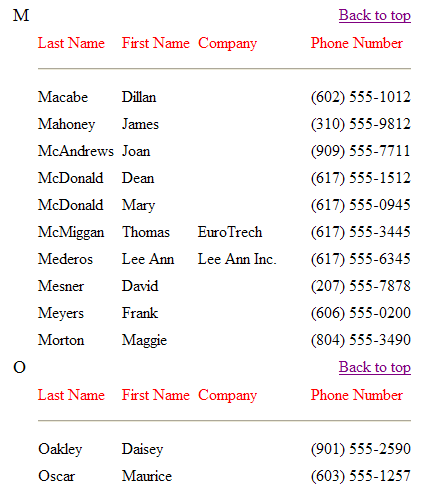
The following is a sample of the report.
Chunked Reports
Chunked responses are enabled beginning with v4.6.4.7 for HTML reports. Previously only PDF reports honored the Chunked reports setting. Additionally, if you use Action Javascript to render an HTML report and then if you click the PDF button in the report window, the PDF report will honor the chunked report settings.
See Also